DBLab 4.1: protection leases, Teleport, Prometheus, and more

ยท 11 min read
Nikolay Samokhvalov
CEO & Founder
DBLab 4.1: protection leases, Teleport, Prometheus, and more

Forty engineers. Hundreds of database clones per week. A handful marked "protected" because someone was mid-investigation. Then the investigation ended, the engineer moved on, and the clone stayed -- protected, idle, quietly eating 200 GB of disk for three weeks.

We kept hearing this story from teams running DBLab in production. So we fixed it -- along with five other things that matter when you operate database branching at scale.

DBLab 4.0 introduced instant database branching with O(1) economics. With 4.1, we're making it safe to hand off to a platform team: automatic resource governance, enterprise access control, production-safe data refresh, and native observability.

Protection leases: clones that clean up after themselvesโ€‹

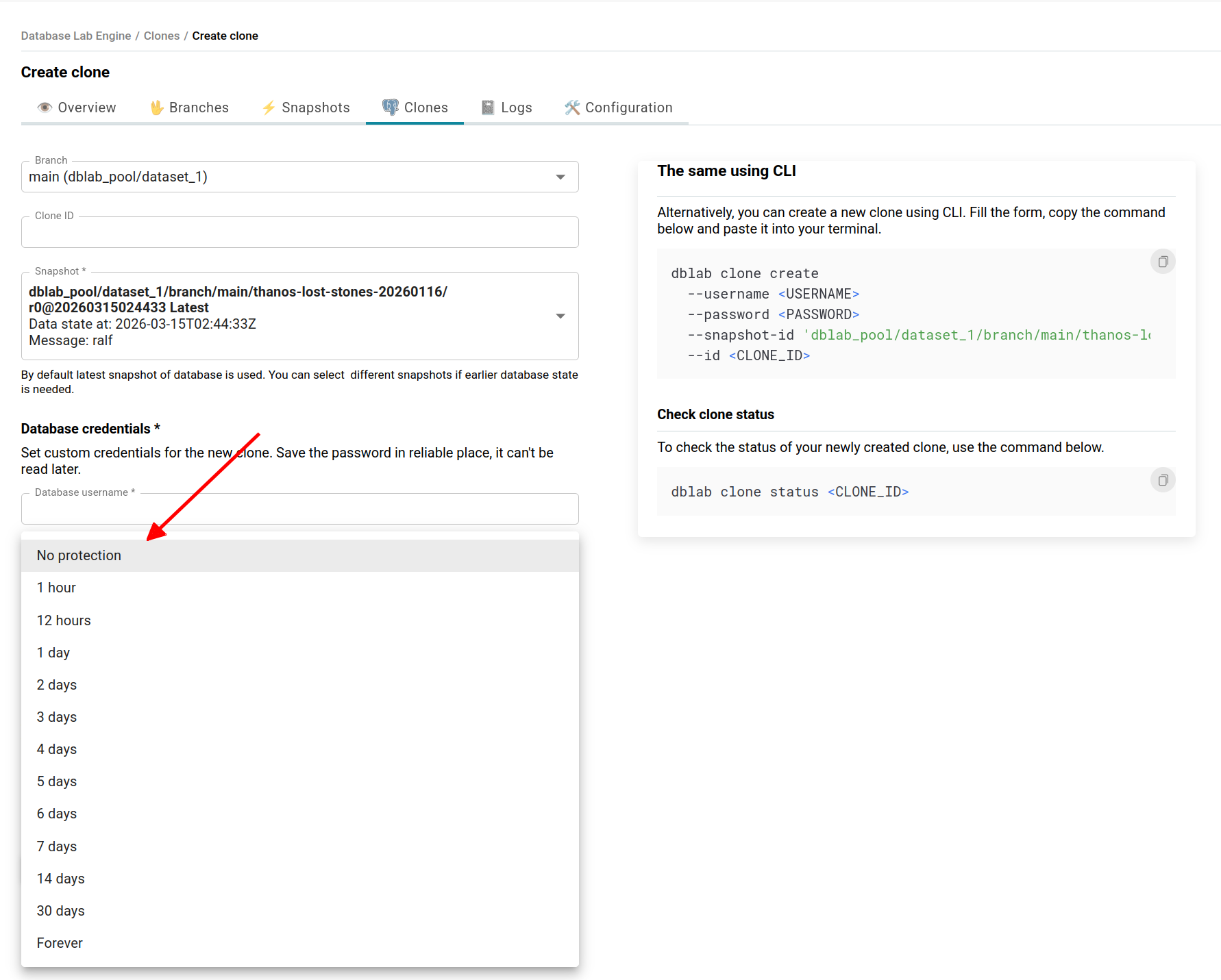
Before 4.1, marking a clone as "protected" meant it stayed forever. That was the point -- but also the problem. Engineers protect clones and forget about them. Somebody has to audit. Nobody wants to be that somebody.

Now protection has a timer.

How it looks in practiceโ€‹

Your CI pipeline creates a clone to test a migration and sets a 2-hour lease:

dblab clone create \
--branch main \
--id ci-migration-test-4521 \
--protected 120 \
--username postgres \
--password "$CI_DB_PASSWORD"

Two hours later, the CI job is done. The lease expires, protection lifts, and DBLab's idle cleanup reclaims the clone. No human intervention.

The --protected flag accepts several forms:

  • --protected true -- use the server's default lease duration
  • --protected 120 -- protect for exactly 120 minutes
  • --protected 0 -- protect forever (capped by protectionMaxDurationMinutes if configured)
  • --protected false -- disable protection on an existing clone

Or through the API:

POST /clone
{
"id": "my-clone",
"protected": true,
"protectionDurationMinutes": 120,
"db": { "username": "postgres", "password": "secret" },
"branch": "main"
}

The response includes a protectedTill timestamp, so clients always know when protection will expire.

What happens at expiryโ€‹

A background checker runs every 5 minutes. When a lease expires:

  1. Protection is lifted (protected: false, protectedTill: null)
  2. A clone_protection_expired webhook fires
  3. The clone becomes subject to normal idle cleanup

This doesn't force-destroy anything. If the clone is still receiving queries, idle cleanup won't touch it. Leases only affect the protection status.

Before expiration, a clone_protection_expiring warning webhook fires too. Wire it to Slack so the clone owner can extend if they're still working:

dblab clone update ci-migration-test-4521 --protected 1440

Server-side guardrailsโ€‹

Three options in the cloning section:

cloning:
protectionLeaseDurationMinutes: 1440 # default lease: 24 hours
protectionMaxDurationMinutes: 10080 # hard cap: 7 days
protectionExpiryWarningMinutes: 1440 # warn 24 hours before expiry

If someone requests 30 days but the cap is 7, the lease is silently capped at 7 days. Platform teams get a hard guarantee: no clone stays protected longer than one week.

Database rename: no more production names in devโ€‹

You clone your production database. The clone keeps the name myapp_production. Your application config connects to myapp_production. Suddenly, a developer isn't sure which environment they're querying.

This is a real class of bugs. DBLab 4.1 eliminates it with databaseRename: rename databases during snapshot creation, so every clone gets clean names from the start.

retrieval:
spec:
physicalSnapshot:
options:
databaseRename:
myapp_production: myapp
analytics_prod: analytics

DBLab spins up a temporary container after data restore and executes:

ALTER DATABASE "myapp_production" RENAME TO "myapp";
ALTER DATABASE "analytics_prod" RENAME TO "analytics";

This happens once, at snapshot time. Every clone inherits the renamed databases. No post-creation scripts, no application-side workarounds.

DBLab validates renames before executing: no self-renames, no duplicate targets, no chained renames (a -> b, b -> c), and you can't rename the connection database. Misconfigurations fail early with clear messages, not silently at clone creation. Works in both physical and logical modes.

When to use this: Standardize database names across dev, staging, and CI so your application config doesn't need environment-specific overrides. Or simply remove production identifiers from non-production data for compliance.

ARM64 and Colima: database branching on your Macโ€‹

Before 4.1, running DBLab meant provisioning a Linux VM in the cloud. Now it runs on Apple Silicon. If you have an M-series Mac, you can get full database branching locally with Colima in about 10 minutes.

# Start Colima with enough resources
colima start --cpu 4 --memory 8 --disk 60

# Set up ZFS inside the Colima VM
colima ssh < engine/scripts/init-zfs-colima.sh

The init script installs zfsutils-linux, creates a 5 GB virtual disk, and sets up a ZFS pool with datasets. Then build the ARM64 images:

cd engine
GOOS=linux GOARCH=arm64 make build
make build-image

# PostgreSQL image for ARM64
docker build -f Dockerfile.dblab-postgres-arm64 \
--platform linux/arm64 \
-t dblab-postgres:17-arm64 .

Start the server:

docker run -d --name dblab-server \
--privileged \
-v /var/run/docker.sock:/var/run/docker.sock \
-v /var/lib/dblab:/var/lib/dblab:rshared \
-v /var/lib/docker:/var/lib/docker \
-v /var/lib/dblab/configs:/home/dblab/configs \
-p 2345:2345 \
dblab_server:local

The :rshared mount propagation is important -- it lets ZFS clones inside child containers see the parent's filesystem.

Why this matters: You can experiment with database branching on a plane, in a secure facility, or while waiting for IT to approve a cloud budget. For teams evaluating DBLab, the barrier to entry is colima start and a few commands. Most developers already have the hardware.

See the full macOS setup guide for detailed instructions, including Supabase integration.

Teleport integration: auditable access for every cloneโ€‹

In regulated environments -- finance, healthcare, government -- every database connection must be logged and access-controlled. Ephemeral database clones were historically a gap: they spin up fast, live briefly, and often bypass the access controls you'd apply to long-lived databases.

DBLab 4.1 bridges this gap with native Teleport integration. When a clone is created, it automatically appears as a Teleport database resource with role-based access and session recording. When the clone is destroyed, the resource is removed.

Architectureโ€‹

DBLab ships a sidecar process that bridges the two systems via webhooks:

Developer โ”€โ”€โ”€ tsh db connect โ”€โ”€โ–บ Teleport Proxy โ”€โ”€โ–บ DB Agent โ”€โ”€โ–บ DBLab Clone
โ†‘
DBLab Engine โ”€โ”€ clone_create webhook โ”€โ”€โ–บ Sidecar โ”€โ”€ tctl create โ”€โ”€โ–บ Teleport Auth

When a clone is created, DBLab fires a webhook. The sidecar (dblab teleport serve) registers the clone:

kind: db
version: v3
metadata:
name: "dblab-clone-production-abc123-6000"
labels:
dblab: "true"
environment: "production"
clone_id: "abc123"
spec:
protocol: postgres
uri: "127.0.0.1:6000"

When the clone is deleted, tctl rm cleans up. If the sidecar restarts, it reconciles missed events every 5 minutes by comparing active DBLab clones against registered Teleport resources. This includes a safety check: if the clone list comes back empty but Teleport has registered resources, reconciliation is skipped to prevent accidental mass-deregistration.

Certificate auth, out of the boxโ€‹

DBLab 4.1 ships a new default pg_hba.conf for clones:

local   all all trust
hostssl all all 0.0.0.0/0 cert
host all all 0.0.0.0/0 md5

The hostssl ... cert rule lets Teleport's certificate-based authentication work without custom PostgreSQL configuration. Password-based connections still work via the host ... md5 fallback.

Setupโ€‹

Run the sidecar alongside DBLab:

dblab teleport serve \
--environment-id production \
--teleport-proxy teleport.example.com:3025 \
--teleport-identity /etc/teleport/dblab-identity \
--listen-addr 0.0.0.0:9876 \
--dblab-url http://localhost:2345 \
--dblab-token "$DBLAB_TOKEN" \
--webhook-secret "$WEBHOOK_SECRET"

Configure DBLab to send webhooks:

webhooks:
hooks:
- url: "http://host.docker.internal:9876/teleport-sync"
secret: "your-webhook-secret"
trigger:
- clone_create
- clone_delete

Engineers connect through Teleport like any other database:

tsh db connect dblab-clone-production-abc123-6000 \
--db-user postgres --db-name myapp

Every connection is logged, access is policy-controlled, and sessions can be recorded. Ephemeral clones are no longer a gap in your security posture.

note

Teleport integration requires Standard Edition (SE) or Enterprise Edition (EE).

RDS/Aurora data refresh without touching productionโ€‹

Running pg_dump against a production RDS instance holds an xmin horizon for the duration of the dump -- often hours. Vacuum can't reclaim dead tuples. Bloat accumulates. In severe cases, you risk transaction ID wraparound. And you're putting additional load on the primary.

DBLab 4.1 ships rds-refresh, a standalone tool that gets fresh production data into DBLab without ever connecting to the primary.

How it worksโ€‹

Production โ”€โ”€โ–บ RDS automated snapshot โ”€โ”€โ–บ Temporary RDS clone โ”€โ”€โ–บ pg_dump โ”€โ”€โ–บ DBLab
โ”‚
(auto-deleted)

The tool finds the latest automated snapshot, creates a temporary RDS instance from it, dumps from the temporary instance, feeds data into DBLab's logical refresh pipeline, and deletes the temporary instance. Your production database is never touched.

docker run --rm \
-v $PWD/config.yaml:/config.yaml \
-e DB_PASSWORD -e DBLAB_TOKEN \
-e AWS_ACCESS_KEY_ID -e AWS_SECRET_ACCESS_KEY \
postgresai/dblab-rds-refresh -config /config.yaml

Configurationโ€‹

source:
type: rds # or "aurora-cluster"
identifier: production-db
dbName: myapp
username: postgres
password: ${DB_PASSWORD}

clone:
instanceClass: db.t3.medium # small instance -- it's only for pg_dump
securityGroups:
- sg-0123456789abcdef0
publiclyAccessible: false
enableIAMAuth: true # recommended for AWS security

dblab:
apiEndpoint: https://dblab.internal:2345
token: ${DBLAB_TOKEN}
pollInterval: 30s
timeout: 4h

Five layers of orphan protectionโ€‹

The biggest risk is an orphaned RDS instance: the process crashes, and you're paying for an idle instance nobody knows about. We built five layers of defense:

  1. Defer cleanup -- the temporary instance is always deleted on normal exit
  2. Signal handlers -- SIGINT, SIGTERM, SIGHUP all trigger cleanup before exit
  3. State file -- ./meta/rds-refresh.state tracks the active instance for crash recovery
  4. AWS tag scanning -- instances are tagged ManagedBy=dblab-rds-refresh for discovery
  5. Manual cleanup -- rds-refresh cleanup --max-age 48h finds and removes stale instances

Validate your configuration first with dry-run:

postgresai/dblab-rds-refresh -config /config.yaml -dry-run

Cost and schedulingโ€‹

The temporary RDS instance typically runs for 2-5 hours. At db.t3.medium, that's roughly $0.35-$1.20 per refresh -- negligible compared to the production risk it eliminates.

Schedule it with cron, Kubernetes CronJob, or ECS Scheduled Task for nightly refreshes. Your developers and CI pipelines always start the day with fresh data.

Prometheus metrics: monitor everything, build nothingโ€‹

Before 4.1, monitoring DBLab meant polling the API and building custom dashboards. Now DBLab exposes a /metrics endpoint in Prometheus format -- no auth, no plugin, ready to scrape:

scrape_configs:
- job_name: 'dblab'
static_configs:
- targets: ['dblab.internal:2345']
metrics_path: /metrics

What you can monitorโ€‹

Disk pressure -- the most common operational concern:

100 * dblab_disk_free_bytes{pool="dblab_pool"} / dblab_disk_total_bytes{pool="dblab_pool"}

Clone sprawl -- how many clones exist and how heavy they are:

dblab_clones_total
dblab_clone_total_cpu_usage_percent
dblab_clone_total_memory_usage_bytes
dblab_clone_protected_count

Data freshness -- are your snapshots current:

dblab_snapshot_max_data_lag_seconds / 3600     # snapshot age in hours
dblab_sync_wal_lag_seconds # WAL lag for physical mode

Ready-to-use alertsโ€‹

Copy these into your Prometheus alerting rules:

- alert: DBLabLowDiskSpace
expr: (dblab_disk_free_bytes / dblab_disk_total_bytes) * 100 < 20
for: 5m
annotations:
summary: "DBLab pool {{ $labels.pool }} has less than 20% free disk"

- alert: DBLabStaleSnapshot
expr: dblab_snapshot_max_data_lag_seconds > 86400
for: 10m
annotations:
summary: "DBLab snapshot data is more than 24 hours old"

- alert: DBLabHighWALLag
expr: dblab_sync_wal_lag_seconds > 3600
for: 10m
annotations:
summary: "WAL replay lag: {{ $value | humanizeDuration }} behind"

Not using Prometheus?โ€‹

DBLab includes an OpenTelemetry Collector configuration that exports to Grafana Cloud, Datadog, New Relic, AWS CloudWatch, or any OTLP-compatible backend.

What's in each editionโ€‹

FeatureCE (open source)SEEE
Protection leases+++
Database rename+++
ARM64 / Colima+++
Prometheus exporter+++
RDS/Aurora safe refresh+++
Teleport integration++

What's nextโ€‹

We're working on three things for upcoming releases:

  1. Logical replication for continuous refresh -- keep snapshots updated in real time without full pg_dump cycles, the way physical mode already works
  2. ZFS send/recv for instance sync -- replicate data between DBLab instances, including from a staging server to a developer's laptop
  3. Major version upgrade testing -- spin up a clone on a newer Postgres version to test major upgrades before committing

Get startedโ€‹

  1. Try the demo: demo.dblab.dev (token: demo-token)
  2. Deploy DBLab SE: AWS Marketplace or Postgres.ai Console
  3. Install open source: How-to
  4. macOS setup: Run DBLab on Mac
  5. Enterprise: Contact [email protected] for DBLab EE

DBLab 4.0 made database branching instant. DBLab 4.1 makes it something you can hand off to a platform team and trust to run itself. Protection leases keep resources in check. Teleport keeps access auditable. Prometheus keeps you informed. And rds-refresh keeps data fresh without risking production.

All of it on top of the O(1) economics that make DBLab unique.

Get Started | GitHub | Join our Slack

Nikolay Samokhvalov
Nikolay Samokhvalov

CEO & Founder of PostgresAI

Working on tools to balance Dev with Ops in DevOps

Database Lab
DBLab Engine 4.0

Instant database branching with O(1) economics.